
Custom Request Forms
Kick off new projects by using a form to make sure all the necessary project information is provided.
A collaborative work management platform for tracking tasks, managing projects, and aligning teams.

10 features everyone loves about Wrike.
Kick off new projects by using a form to make sure all the necessary project information is provided.
Keep track of documents, see who is responsible, address pending approvals before they delay a project, and gain full visibility on approval decisions.
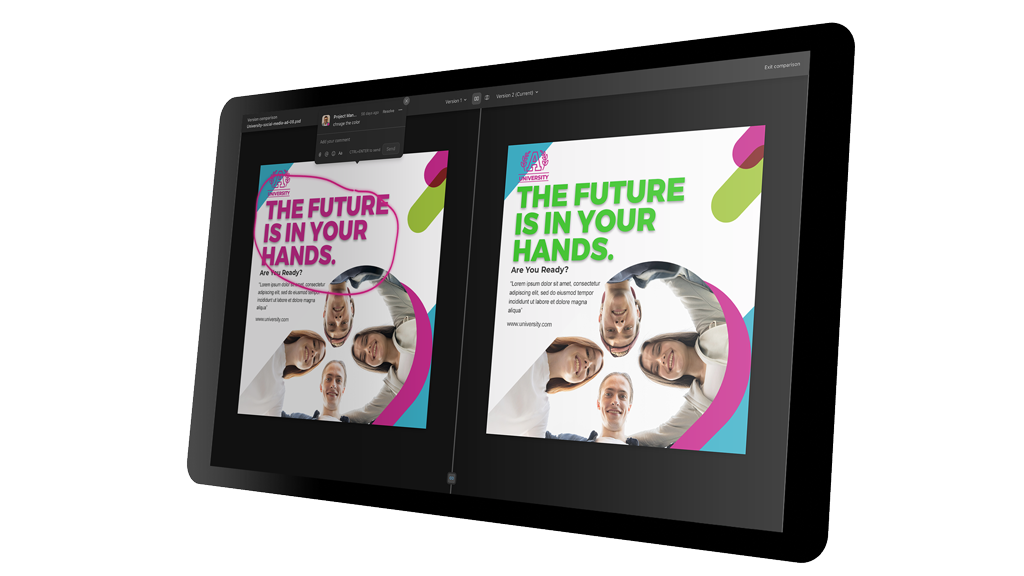
Version control in Wrike ensures that all files you upload, whether they are PDFs, images, Office documents, or videos, are accurately shared with everyone, allowing for easy comparison of changes and ensuring that the correct version is always visible to all team members.
In Wrike, you can use a default workflow or create a new custom workflow to meet your team’s needs and add statuses within that workflow that reflect the typical states your tasks, projects, or items go through.
Easily spot which team members are overtasked and which team members are underutilized.
Wrike’s dashboard centralizes project metrics, task statuses, and timelines, empowering quick decision-making and seamless resource allocation. Real-time visibility into project progress fosters team collaboration and accountability, while customizable views cater to individual preferences.
Break down projects into manageable tasks and subtasks, assign responsibilities, and track progress to ensure nothing falls through the cracks.
Monitor how much time is spent on tasks and projects, helping teams improve efficiency, manage workloads, and stay within budget.
Visualize project timelines, dependencies, and milestones with interactive Gantt charts, making it easier to plan and adjust schedules.
Reduce manual work by automating repetitive tasks, status updates, and notifications, ensuring workflows run smoothly and efficiently.